

General
PostgreSQL Query Performance Analysis
SQL tuning is critically important for ensuring database performance, reliability, and scalability. In most cases, performance issues in a database are caused by poorly performing SQL queries.
In PostgreSQL, the first step in optimization is to identify the top slow-performing queries. You can do this by using the pg_stat_statements view, which provides execution statistics for all SQL queries that have been run by the database.
To find the top 10 queries by total execution time, you can use the following SQL query;
To find top 10 queries according to average of query time which runs more than 100 times ,you can use the following SQL query;
Next step is to analysis execution plan for the top consuming queries. For this you can use “explain ” keyword as below;
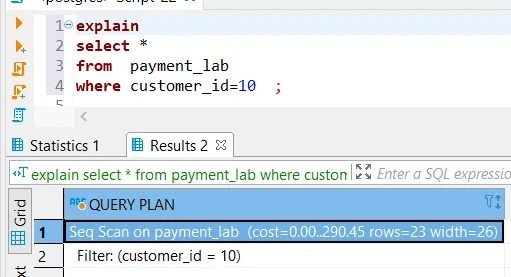
Execution plan for a simple query for PostgreSQL
In a simple query execution plan, you’ll encounter operators such as Seq Scan, Filter, and others. For example, a Seq Scan (sequential scan) indicates that PostgreSQL is scanning the entire payment_lab table and then applying a filter — in this case, customer_id = 10. This means all rows are read into memory before the filter condition is evaluated.
It’s important to pay attention to the cost shown in the first line of the execution plan. Generally:
A high cost indicates a potentially inefficient query.
A low cost suggests better performance.
The rows value shows the planner's estimate of how many rows will be returned — in this case, it expects 23 rows.
To improve performance and reduce the cost, you can create an index on the customer_id column. This allows PostgreSQL to perform an Index Scan instead of a full table scan, making the query faster and more efficient.

After creating the index, the query cost was reduced from 290 to 60, and the execution plan changed accordingly. In the new plan, a Filter operation was replaced by an Index Condition (Index Cond), indicating that the query is now utilizing the index efficiently.
You can analyze the original plan to identify Filter operators. These filters often indicate candidates for indexing — especially if they operate on columns frequently used in WHERE clauses.
Steps to Optimize Query Performance for missing indexes in general:
Identify Filtered Columns:
Review the original execution plan.
Look for Filter operations and note the columns involved.
Create Index:
Create an index on one or more of the columns used in the filters.
Run
EXPLAINor a similar command after creating the index to see plan.Check for a shift from Filter to Index Cond, and note the new estimated cost.
Measure Execution Time:
Run the query before creating the index and record the execution time.
Run the query after creating the index and record the new time.
Compare Performance:
Compare the original and new execution times and costs.
A significant reduction in both suggests that the index improves query performance.