

General
Open Source Data Masking with PostgreSQL
Data masking in databases is a technique used to protect sensitive data by hiding (masking) it from unauthorized users while still allowing the database to function normally for those users. It helps in maintaining data privacy and complying with regulations like GDPR, HIPAA, etc.
You can use open source PostgreSQL Anonymizer is an extension to mask sensitive data from a Postgres database.
It provides 5 different masking methods :
Anonymous Dumps : Simply export the masked data into an SQL file
Static Masking : Remove the PII according to the rules
Dynamic Masking : Hide PII only for the masked users
Masking Views : Build dedicated views for the masked users
Masking Data Wrappers : Apply masking rules on external data
In this blog I will show you how to install,configure postgresql anonymizer extension and also show a simple dynamic masking case.
Installation instructions for rocky linux 8 and postgresql 17
DO NOT use the package provided by the PGDG RPM repository. It is obsolete.
Add repository
sudo dnf install https://yum.dalibo.org/labs/dalibo-labs-4-1.noarch.rpm
2. install rpm as root user
sudo yum install postgresql_anonymizer_17 -y
3. Load the extension for database
[postgres@postgres01 ~]$ psql
psql (17.5)
Type “help” for help.
postgres=# alter database demodb SET session_preload_libraries = ‘anon’;
ALTER DATABASE
postgres=#
4. Create the extension
postgres=# \c demodb
You are now connected to database “demodb” as user “postgres”.
demodb=# CREATE EXTENSION anon;
CREATE EXTENSION
demodb=# SELECT anon.init();
Dynamic Masking Example
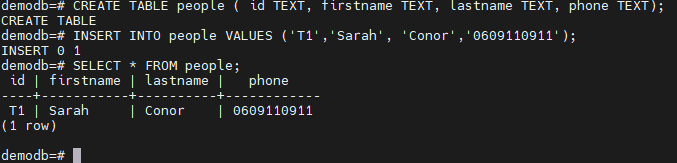
CREATE TABLE people ( id TEXT, firstname TEXT, lastname TEXT, phone TEXT);
INSERT INTO people VALUES (‘T1’,’Sarah’, ‘Conor’,’0609110911');
Step 1 : Activate the dynamic masking engine
ALTER DATABASE demodb SET anon.transparent_dynamic_masking TO true;

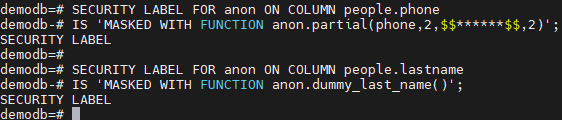
Step 2 : Declare the masking rules
SECURITY LABEL FOR anon ON COLUMN people.phone
IS ‘MASKED WITH FUNCTION anon.partial(phone,2,$$******$$,2)’;
SECURITY LABEL FOR anon ON COLUMN people.lastname
IS ‘MASKED WITH FUNCTION anon.dummy_last_name()’;
Step 3 : Declare a masked user with read access
CREATE ROLE skynet LOGIN;
SECURITY LABEL FOR anon ON ROLE skynet IS ‘MASKED’;
GRANT pg_read_all_data to skynet;

Step 4 : Connect with the masked user
\c — skynet
SELECT * FROM people;
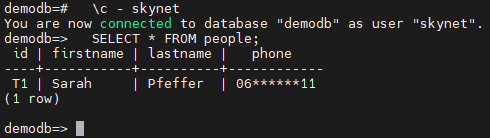
As you see phone column values is masked and lastname column values anonymized.
Let's connect with postgres user and see actual table values.
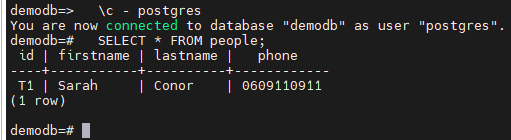
Since dynamic masking is masking on the fly, only roles that you want to mask data will see masked data. Other users will see actual values.
PostgreSQL Anonymizer is a comprehensive and powerful extension for data masking. It provides a wide range of features to help you protect and anonymize sensitive data. You can find more detailed information at the link below.