Concurrency in databases is inevitable. When multiple users access the same table simultaneously, lock mechanisms come into play to maintain data integrity. InnoDB provides a highly sophisticated structure in this regard.
In this article, we will examine InnoDB’s record locks, gap locks, next-key locks, and other special lock types with examples. We will also demonstrate what can happen through a deadlock scenario.
1. Where Do We See Locks?
To monitor the locks created by InnoDB:
SELECT thread_id, event_id,
       object_schema, object_name, index_name,
       lock_type, lock_mode, lock_status, lock_data
FROM
SELECT thread_id, event_id,
       object_schema, object_name, index_name,
       lock_type, lock_mode, lock_status, lock_data
FROM
SELECT thread_id, event_id,
       object_schema, object_name, index_name,
       lock_type, lock_mode, lock_status, lock_data
FROM
Let’s take a look at the locks generated by this query. For example, when we run the following query:
UPDATE world.city
SET CountryCode = 'LX'
WHERE CountryCode = 'LUX';
UPDATE world.city
SET CountryCode = 'LX'
WHERE CountryCode = 'LUX';
UPDATE world.city
SET CountryCode = 'LX'
WHERE CountryCode = 'LUX';
Assuming the thread id is 111, we will see the following rows:
*************************** 1. row ***************************
 thread_id: 111
 event_id: 10
 object_schema: world
 object_name: city
 index_name: NULL
 lock_type: TABLE
 lock_mode: IX
 lock_status: GRANTED
 lock_data: NULL

*************************** 2. row ***************************
 thread_id: 111
 event_id: 10
 object_schema: world
 object_name: city
 index_name: CountryCode
 lock_type: RECORD
 lock_mode: X
 lock_status: GRANTED
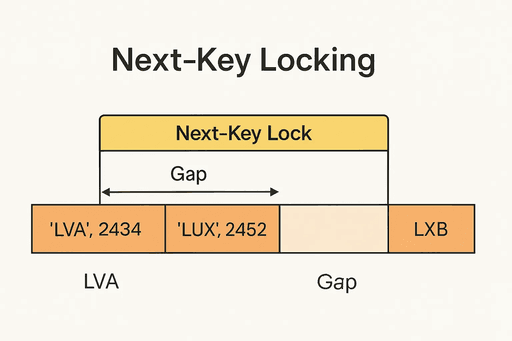
 lock_data: 'LUX', 2452

*************************** 3. row ***************************
 thread_id: 111
 event_id: 10
 object_schema: world
 object_name: city
 index_name: PRIMARY
 lock_type: RECORD
 lock_mode: X,REC_NOT_GAP
 lock_status: GRANTED
 lock_data: 2452

*************************** 4. row ***************************
 thread_id: 111
 event_id: 10
 object_schema: world
 object_name: city
 index_name: CountryCode
 lock_type: RECORD
 lock_mode: X,GAP
 lock_status: GRANTED
 lock_data: 'LVA', 2434
*************************** 1. row ***************************
 thread_id: 111
 event_id: 10
 object_schema: world
 object_name: city
 index_name: NULL
 lock_type: TABLE
 lock_mode: IX
 lock_status: GRANTED
 lock_data: NULL

*************************** 2. row ***************************
 thread_id: 111
 event_id: 10
 object_schema: world
 object_name: city
 index_name: CountryCode
 lock_type: RECORD
 lock_mode: X
 lock_status: GRANTED
 lock_data: 'LUX', 2452

*************************** 3. row ***************************
 thread_id: 111
 event_id: 10
 object_schema: world
 object_name: city
 index_name: PRIMARY
 lock_type: RECORD
 lock_mode: X,REC_NOT_GAP
 lock_status: GRANTED
 lock_data: 2452

*************************** 4. row ***************************
 thread_id: 111
 event_id: 10
 object_schema: world
 object_name: city
 index_name: CountryCode
 lock_type: RECORD
 lock_mode: X,GAP
 lock_status: GRANTED
 lock_data: 'LVA', 2434
*************************** 1. row ***************************
 thread_id: 111
 event_id: 10
 object_schema: world
 object_name: city
 index_name: NULL
 lock_type: TABLE
 lock_mode: IX
 lock_status: GRANTED
 lock_data: NULL

*************************** 2. row ***************************
 thread_id: 111
 event_id: 10
 object_schema: world
 object_name: city
 index_name: CountryCode
 lock_type: RECORD
 lock_mode: X
 lock_status: GRANTED
 lock_data: 'LUX', 2452

*************************** 3. row ***************************
 thread_id: 111
 event_id: 10
 object_schema: world
 object_name: city
 index_name: PRIMARY
 lock_type: RECORD
 lock_mode: X,REC_NOT_GAP
 lock_status: GRANTED
 lock_data: 2452

*************************** 4. row ***************************
 thread_id: 111
 event_id: 10
 object_schema: world
 object_name: city
 index_name: CountryCode
 lock_type: RECORD
 lock_mode: X,GAP
 lock_status: GRANTED
 lock_data: 'LVA', 2434
lock_mode: IX → Table-level signal that “a row in this table has been locked”
lock_mode: X,REC_NOT_GAP → Direct lock on the row itself
lock_mode: X,GAP → Locks the gap between rows
lock_mode: X,INSERT_INTENTION → Waiting lock for an insert attempt
2. Record Locks and Next-Key Locks
Record Lock: Locks a specific row.
Next-Key Lock: Combination of a record lock and a gap lock.
With a next-key lock, not only the selected row but also the surrounding gap is locked. This prevents the phantom read problem.
3. Gap Locks
A gap lock doesn’t lock the row itself, but the space before or after it.
Example:
UPDATE table_xxx SET amount = 100 WHERE id BETWEEN 100 AND 200
UPDATE table_xxx SET amount = 100 WHERE id BETWEEN 100 AND 200
UPDATE table_xxx SET amount = 100 WHERE id BETWEEN 100 AND 200
This statement places locks on all rows with id between 100 and 200 during the update or throughout the transaction.
A typical scenario looks like this:
id is an auto_increment column. Suppose the last id is 150.
The above update runs inside a transaction but is not committed (or it takes a long time).
Another transaction tries to insert into the same table. Indirectly, it attempts to get id = 151 from auto_increment, but gets blocked.
Looking at the running queries, it may appear that nothing should block this insert, but the gap lock is there, silently holding it back.
4. Insert Intention Locks
When a transaction attempts to insert a new row within a certain range, InnoDB creates an insert intention lock. This isn’t a real blocking lock but more like a “waiting in line” signal.
It’s similar to mini-waits caused by auto_increment allocation, semaphores, or index updates.
The advantage is that multiple transactions can attempt inserts in the same range without immediate conflict, reducing the risk of deadlocks.
5. Deadlock Scenario
A deadlock occurs when two transactions wait on each other indefinitely.
Example:
Transaction 1:
BEGIN;
UPDATE city SET CountryCode = 'AAA' WHERE ID = 1001
BEGIN;
UPDATE city SET CountryCode = 'AAA' WHERE ID = 1001
BEGIN;
UPDATE city SET CountryCode = 'AAA' WHERE ID = 1001
Transaction 2:
BEGIN;
UPDATE city SET CountryCode = 'BBB' WHERE ID = 2002
BEGIN;
UPDATE city SET CountryCode = 'BBB' WHERE ID = 2002
BEGIN;
UPDATE city SET CountryCode = 'BBB' WHERE ID = 2002
Then both try to update each other’s row:
T1 → UPDATE city SET CountryCode = 'CCC' WHERE ID = 2002;
T2 → UPDATE city SET CountryCode = 'DDD' WHERE ID = 1001;
Result: Deadlock ❌
InnoDB detects this and rolls back one of the transactions.
6. Deadlock Prevention Tips
Keep a consistent access order (all transactions update tables in the same sequence).
Use short transactions (reduces lock duration).
Separate reads from writes.
Choose the isolation level carefully (e.g., READ COMMITTED may be safer in some cases).
Conclusion
By flexibly using its row-level lock mechanisms, InnoDB manages:
Rows with Record Locks,
Gaps between rows with Gap Locks,
Both together with Next-Key Locks,
Insert attempts with Insert Intention Locks.
This strong structure preserves data consistency, but also brings the risk of deadlocks. Therefore, understanding these lock types is critical for designing performant and reliable transactions.