

General
How Does MySQL Use Disk?
Understanding how MySQL works involves knowing how it uses system resources. In this context, as the first part of a series of articles, I wanted to publish an article about MySQL disk usage. Starting by explaining where and how MySQL stores data on disk will be a good introduction to begin understanding the structure of MySQL.
MySQL Data Files
For the rest of this article, I assume you are using InnoDB, the most commonly used and default storage engine in MySQL.
Important Note: If you are using a different storage engine, the behavior of writing and reading data to disk will be completely different.
At this point, since the concept of tablespace has different meanings for different database types, we can start by explaining what tablespace means in MySQL. In the MySQL world, the term tablespace can be defined as the file in which InnoDB physically stores data and indexes inside data blocks. A system can have one or multiple tablespaces. Database tables or indexes may be grouped within common tablespaces.
With this configuration, MySQL creates a separate tablespace for each table it generates. This is the most preferred method. This setting comes as ON by default in recent versions. As the parameter name suggests, it creates a separate database file for each database table. The table’s data and the data of the indexes on the table are stored within this file.
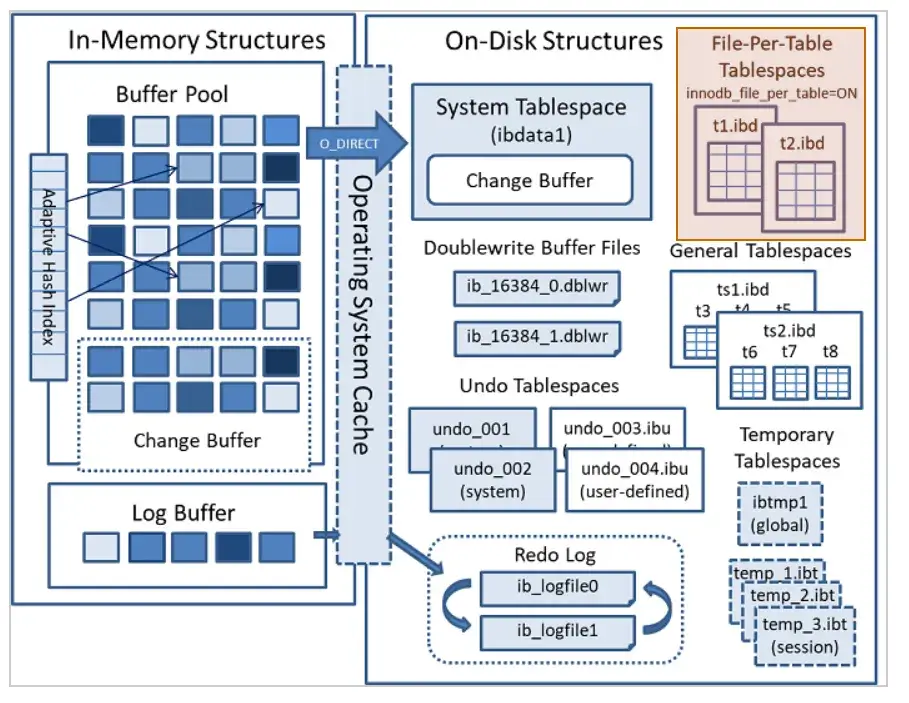
A file with the same name as the table and with the .ibd extension is created for each table. Unless limited, these files can grow on disk as long as there is available space.
The size of an
.ibdfile is not the same as the size of the data inside it.
A common misconception is to assume that the disk space occupied by .ibd files exactly matches the size of the data they contain. While this can be true in some cases, it is important not to overlook the following points:
If the table has delete and update operations, fragmentation can occur in the related
.ibdfiles. Therefore, the actual data may take up less space than the size of the file on disk..ibdfiles store not only data but also indexes. In fact, it is expected that data occupies only a part of the.ibdfile in tables that have indexes.
So, how do we shrink InnoDB tables that have grown uncontrollably and become fragmented? The best way is to rebuild the table. In the example below, I wrote a rebuild command for a table to perform a non-blocking rebuild. Thanks to the two extra options added at the end of the ALTER statement, it is possible to rebuild the table while the system is running.
Since MySQL version 5.7, online DDL operations have been supported.
At this point, we return to the question of how MySQL uses disk space. It is important to be aware that during the rebuild process, a temporary .ibd file for the new table will be created and will use disk space. In other words, if we are rebuilding a large table, we need to ensure that there is enough temporary space on the disk equal to the new size of the table after the rebuild.
To illustrate with an example: Suppose we have a table that has grown up to 300GB. After performing some cleanup or offloading operations, we deleted part of the data and shrank the table. However, due to the reasons mentioned above, the table still occupies 300GB on disk. According to our estimates, the size will reduce to around 50GB after the rebuild. In this case, we must make sure that we have at least 50GB of free space on the disk temporarily for this operation.
Finally, let’s conclude this article with an SQL query that shows how to calculate the sizes mentioned in this example.
With this query, you can find out the sizes of all files in the system and how much free space they contain.